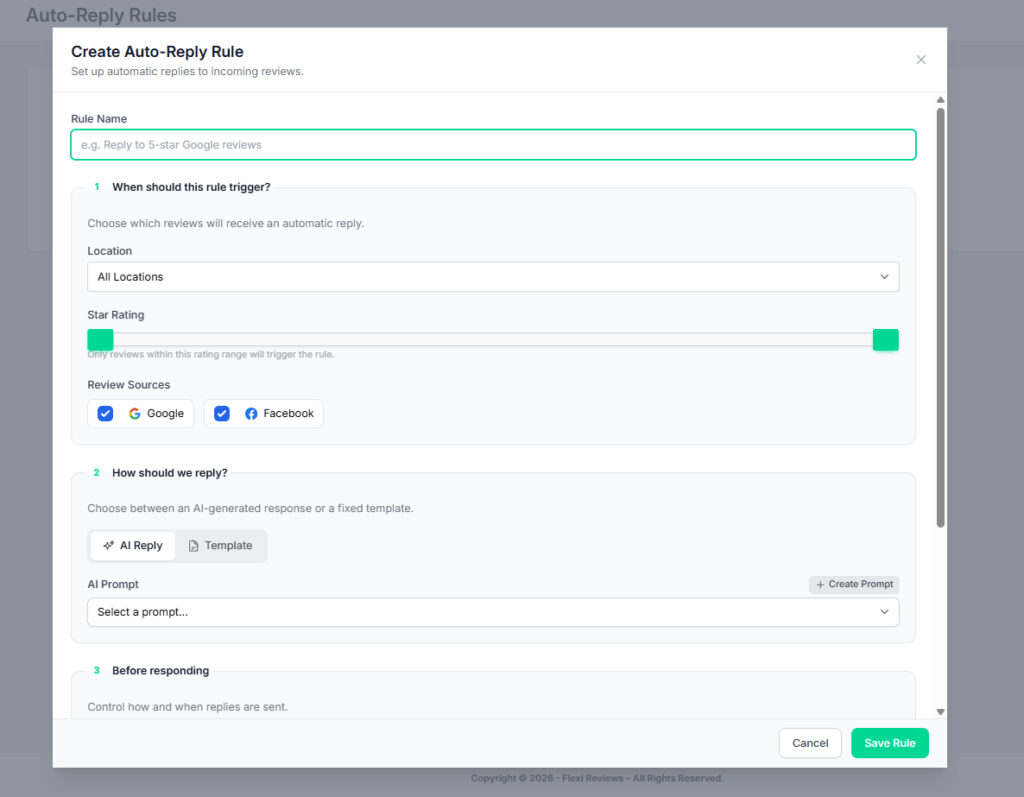
Now we will setup ai auto respond features, for this first we go to dashboard here you can find Auto respond features click on this you will redirect to this windo where you can get option for create a new rule for auto respond.
Now one popup form fill open hereyou can give name for your rule, we create 2 rules in this 1st is for 4star rating and 2nd for 5 star rating. So first we give rule name then select our gmb /location, then set a rating 4, then select review source platform, then you have 2 option AI reply and template (in ai reply you need to give prompt so ai reply according that and in template option you will write manually reply with fix filed so it will work accordingly) so we apply ‘Ai reply’ features (prompt given below) you can use as it is
Final Prompt Template – 4★ Auto Response (Generic Use) #
Write a polite and professional response to a 4-star customer review for a business.
Instructions #
- Thank the customer for their feedback
- Acknowledge their positive experience
- Subtly recognize that there may be room for improvement
- If the review mentions any issue, respond politely and show willingness to improve
- Keep the tone friendly, natural, and human-like
- Do NOT sound overly promotional or robotic
- Keep the response short (2–4 lines)
- Use simple and clear English
- Do NOT include emojis
- Do NOT ask questions
- Avoid repeating the same phrases
SEO Guidelines #
- Naturally include 1 relevant keyword (service/product/location) if available
- Do NOT force keywords unnaturally
- Avoid keyword stuffing
- Use variations for a natural feel
Optional Inputs (if available) #
- Business Name: {business_name}
- Service/Product: {service_type}
- Location: {location}
- Keywords: {keywords}
👉 If provided, use these details naturally in the response.
Input #
Customer Review: {review_text}
Output #
Write a short, balanced, and thoughtful response that shows appreciation and a commitment to improvement.
Final Prompt Template – 5★ Auto Response (Generic Use) #
Write a polite and professional response to a 5-star customer review for a business.
Instructions #
- Thank the customer warmly for their review
- Show strong appreciation and happiness
- Reinforce the positive experience mentioned in the review
- Keep the tone friendly, cheerful, and human-like
- Do NOT sound overly promotional or robotic
- Keep the response short (2–4 lines)
- Use simple and clear English
- Do NOT include emojis
- Do NOT ask questions
- Avoid repeating the same phrases
SEO Guidelines #
- Naturally include 1 relevant keyword (service/product/location) if available
- Do NOT force keywords unnaturally
- Avoid keyword stuffing
- Use variations for a natural feel
Optional Inputs (if available) #
- Business Name: {business_name}
- Service/Product: {service_type}
- Location: {location}
- Keywords: {keywords}
👉 If provided, use these details naturally in the response.
Input #
Customer Review: {review_text}
Output #
Write a short, appreciative, and engaging response that reflects customer satisfaction.